Likelihood Evidence
Context
Setting Likelihood Evidence (also called Soft Evidence) means modifying the probability distribution of a node. The resulting relative likelihoods allow you to compute, for each state, a factor used to update the probability distribution.
A node state with a zero likelihood value is an impossible state. If all the states have the same likelihood, the probability distribution remains unchanged.
Usage
There are two ways to set Soft Evidence:
- Press
Shiftwhile clicking on the bar of a state. - Select
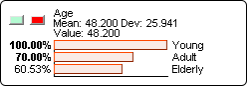
Likelihood Evidencefrom the Monitor Contextual Menu. Green and red buttons are then added to the Monitor. Enter likelihoods by holding the left mouse button while choosing the desired likelihood level, or by double-clicking the value to edit it directly.
Once all likelihoods are entered, the light green button validates the entry and updates the probability distribution; the red button cancels likelihood editing.
Result after validating with the light green button (the observed node takes the light green color of the evidence):
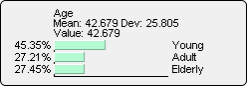
With Likelihood Evidence, you modify the Monitor’s marginal distribution by applying a factor to the probability of each state. Upon activating it, all factors are set to 1 (all bars at 100%). You then adjust the bars with the cursor, or type in the percentage value. Clicking the green button confirms your choice, and BayesiaLab displays a new, normalized distribution in which each state has been multiplied by the specified factor.