Episode 2: Michel De Montaigne —Les Essais

This second Philosophical Minute example analyzes a passage from “Of Liars” in Book I of Montaigne’s Essais.
This is a formidable challenge for Hellixia, given that it relies on a translation from Old French.
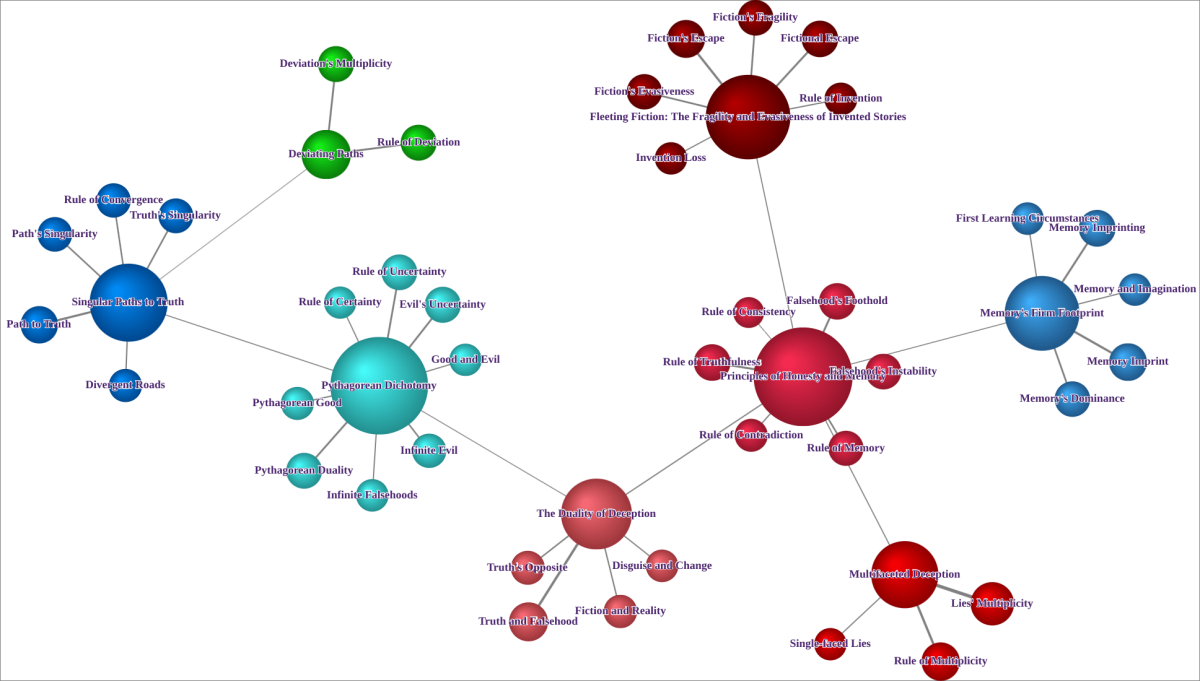
When they disguise and change, when they are often put back on the same story, it is difficult for them not to make mistakes, because the thing as it is, having lodged itself first in memory and having been imprinted there by way of knowledge and science, it is difficult for it not to be represented in the imagination by dislodging the falsehood, which cannot have as firm and steady a foothold, and for the circumstances of the first learning not to cause the memory of the added, false or bastardized pieces to be lost.
In what they invent completely, because there is no contrary impression that contradicts their falsehood, they seem to have all the less to fear to make mistakes. However, this fiction, because it is a vain and ungraspable body, readily escapes memory if it is not well secured.
If, like truth, lies had only one face, we would be in a better position, for we would take the opposite of what the liar said as certain. But the reverse of truth has a hundred thousand faces and an indefinite field. The Pythagoreans posit that good is certain and finite, evil infinite and uncertain. A thousand roads deviate from the goal, only one leads to it.
This post is also linked to a discussion we had at Marcello Di Bello’s presentation, Cross-Examination with Bayesian Networks (BayesiaLab Conference, 2022).
Workflow for Creating a Network of Keywords
Start by creating a new node and label it as “Montaigne”. This node will serve as a container for the text you want to analyze.
Input the selected text into the node as a comment.
Run the Dimension Elicitor, set the General Context to “Philosophy”, and input “Keywords” as the keyword for the analysis of the node comment.
Examine the dimensions or keywords returned by Hellixia. Remove any dimensions that seem redundant or irrelevant to the analysis.
Use the Embedding Generator on all remaining nodes. This tool captures and quantifies the semantics associated with the names and comments of each node.
Set “Montaigne” as the Target Node. The subsequent analyses and operations will focus on this node.
Run the Naive Learning algorithm.
Alter the style of all nodes to “Badges”. This style will display the comment within each node.
Switch to Validation Mode F5.
Run the Arc Force analysis.
While still in the Arc Force analysis tool, run the Radial Layout. This layout arranges the nodes in a clockwise manner according to the strength of their relationships with the target node.
These comments will provide information about the strength of the relationships between nodes.
Workflow for Creating the Semantic Network
Begin by copying the node titled .
Create a new graph and paste the copied node into it.
Run the Dimension Elicitor using the following keywords to guide the analysis of the node: Contents, Ideas, Milestones, Rules, Themes, Theses, and the General Context set to “Philosophy”.
Examine the dimensions provided by Hellixia. Remove any dimensions that appear redundant or irrelevant to the analysis.
The node.
Use the Embedding Generator on all remaining nodes. This will help capture the semantic associations of their names and comments.
Use the Maximum Weight Spanning Tree algorithm to form a semantic network from the analyzed text.
Change node styles to “Badges”. This style will allow the comment within each node to be shown.
Use this layout option to organize the nodes on the graph. This layout algorithm is not deterministic, and it randomly favors vertical, horizontal, or mixed orientations. Run this layout multiple times until you find a layout that suits the intended presentation.
Switch to Validation Mode F5.
Since the network does not represent causal relationships, choose the Skeleton View. This will remove the arc orientations, leaving only connections between nodes without indicating a direction.
Workflow for Node Force Analysis
Switch back to Modeling Mode F4.
Change node styles to Discs.
Apply the symmetric layout.
Enter Validation Mode.
Analyze Node Force.
Workflow for Creating the Hierarchical Semantic Network
This will identify and group similar variables based on their semantics.
Open the Class Editor.
Within the Class Editor, activate the Class Description Generator.
Use it to create meaningful names for the factors you’re working with.
Save the descriptions you’ve just created using the Export Descriptions feature.
Switch back to Modeling Mode F4.
Execute Multiple Clustering to create latent variables.
Next, execute the structural learning algorithm Taboo. Make sure to enable the option Delete Unfixed Arcs. This should result in the creation of a hierarchical network.
Use the descriptions you exported earlier as a Dictionary to rename the latent variables you’ve created.
Switch to Validation Mode F5.
Use Node Force.