
Import
A saved Evidence Scenario File can be re-imported into the network from which it originated (e.g., after external modification; see Evidence Scenario File Syntax) or loaded into an entirely different network file.
Select Menus > Data > Evidence Scenarios > Associate. If the newly associated Evidence Scenario File contains incompatible content (e.g., nonexistent nodes in the network), BayesiaLab shows a corresponding error message:
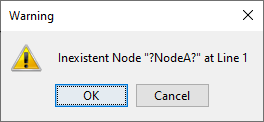
However, the remaining, compatible content will be available in the now-attached Evidence Scenario File.