Radial Layout
Context
The Radial Layout arranges nodes in concentric rings around a Root Node.
Usage
Select Menus > View > Graph Layout > Radial Layout. You can set the root node in two ways:
- Default Root Node: The default root node is the node with the highest degree, i.e., the node that has the most incoming and outgoing arcs.
- Selected Root Node: You can also set the root node manually by selecting a specific node prior to running the Radial Layout algorithm.
Radial Layout Options
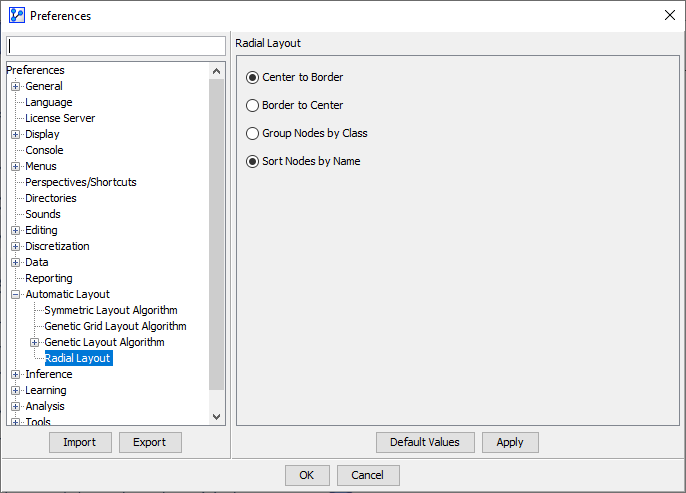
Under Menus > Window > Preferences > Automatic Layout > Radial Layout, you can set several options for the Radial Layout:
- Orientation:
- Center to Border: The algorithm builds the rings beginning at the center, i.e., from the inside out (default).
- Border to Center: The algorithm starts arranging the nodes from the outside in.
- Ordering:
- Group Nodes by Class
- Sort Nodes by Name (default)
Workflow Animation
In the animation, the Radial Layout algorithm is shown using different parameters in the following order:
- Default Root Node & Center to Border
- Selected Root Node & Center to Border
- Default Root Node & Border to Center
- Selected Root Node & Border to Center
Order by Analysis Measures
If the Radial Layout algorithm is performed while certain analysis functions are running, their analysis measures are used for ordering the nodes in a clockwise fashion from highest to lowest.
This applies to the following analysis functions:
Menus > Analysis > Visual > Overall > Arc >:Kullback-Leibler (Arc Force)Mutual InformationPearson Correlation
Menus > Analysis > Visual > Overall > Node ForceMenus > Analysis > Visual > Target > Contributions >:Arc CommentInteractive
Workflow Animation
For illustration purposes, the animation shows how the Radial Layout uses the Kullback-Leibler Divergence (Arc Force) for sorting.
Group Nodes by Class
By default, all nodes are sorted alphabetically according to their name in ascending order counter-clockwise.
However, if Classes are defined for your network, you can select Group Nodes by Class as an alternative ordering option under Menus > Window > Preferences > Automatic Layout > Radial Layout.