
Edit — Delete
Context
From the Delete submenu within the Edit menu, you can delete objects based on certain characteristics, which is especially helpful when editing large and complex Bayesian networks.
Usage
Select Menus > Edit > Delete > ... and see Functions in Detail.
Function Overview
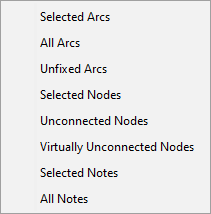
Functions in Detail
Selected Arcsdeletes the selected arcs in the network.All Arcsdeletes all arcs in the network.Unfixed Arcsdeletes all unfixed arcs, i.e., Fixed Arcs are protected from deletion.Selected Nodesdeletes the selected nodes in your network.Unconnected Nodesdeletes only nodes that do not have any arcs connecting them to other nodes.Virtually Unconnected Nodesdeletes those nodes that are only connected by arcs below the selected threshold in the Arc Force Analysis. This particular deletion function is only available if an Arc Force Analysis was performed, a threshold selected, and the selection validated. The complete workflow, including the Arc Force Analysis, is shown in the animation below.Selected Notesdeletes the selected notes on the Graph Panel.All Notesdeletes all notes on the Graph Panel.
Workflow Animation
This animation illustrates the workflow for deleting Virtually Unconnected Nodes.