
Select Nodes
Context
Using Select Nodes, you can select nodes based on their characteristics, which is helpful especially when editing large and complex Bayesian networks.
Usage
Go to Menus > Edit > Select Nodes > ... and see Functions in Detail.
Function Overview
Functions in Detail
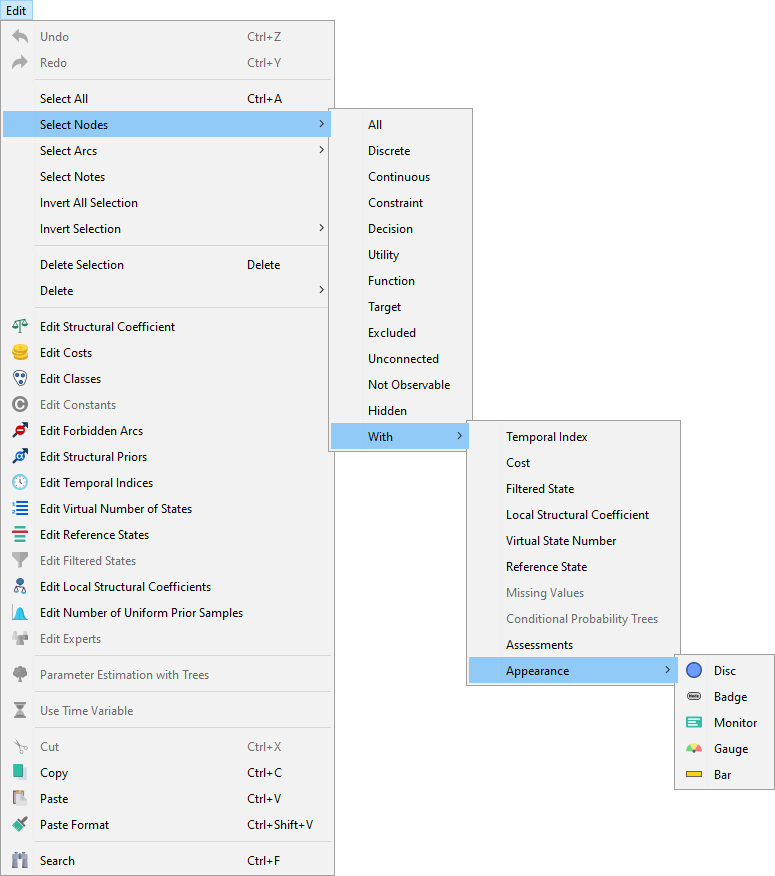
Allselects all nodes.Discreteselects all Discrete Nodes.Continuousselects all Continuous Nodes.Constraintselects all Constraint Nodes.Decisionselects all Decision Nodes.Utilityselects all Utility Nodes.Functionselects all Function Nodes.Targetselects the Target Node.Excludedselects all Excluded nodes.Unconnectedselects all Unconnected nodes.Not Observableselects Not Observable Nodes.Hiddenselects all Hidden Nodes.Withopens a new submenu featuring:-
Temporal Index selects nodes that have a Temporal Index assigned.
-
Costselects nodes that have a Cost assigned. -
Filtered State selects nodes that contain a Filtered State.
-
Local Structural Coefficient selects nodes that have a Local Structural Coefficient.
-
Virtual Number of Statesselects nodes that have a Virtual Number of States assigned. -
Reference Stateselects nodes that contain a Reference State. -
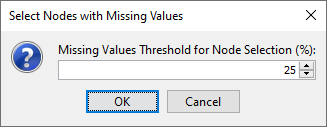
Missing Values selects all nodes that have the percentage of Missing Values greater than the threshold you specify in a pop-up window:
-
Conditional Probability Trees selects nodes that have their Conditional Probability Table defined by Trees.
-
Assessmentsselects all nodes that have at least one Assessment in their Conditional Probability Tables. -
Appearanceopens another submenu featuring the different options for displaying a node:Discselects nodes that appear in the form of a Disc.Badgeselects nodes that appear as a Badge.- Monitor selects nodes that appear as a Monitor.
Gaugeselects nodes that appear as a Gauge.Barselects nodes that appear as a Bar.
-