
Forbidden Arcs
Context
In BayesiaLab, you can formally prohibit arcs by defining so-called Forbidden Arcs. Defining Forbidden Arcs prevents BayesiaLab’s learning algorithms from adding such arcs to the network during the structural learning process.
Usage
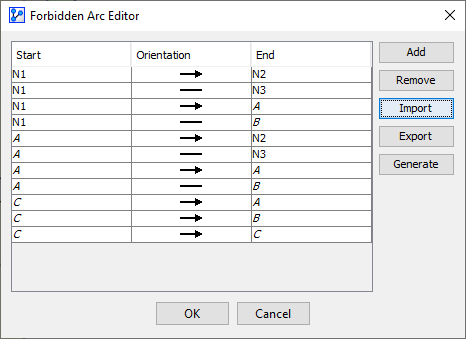
You can define the Forbidden Arcs in the Forbidden Arc Editor. The Forbidden Arc Editor can be accessed in multiple ways:
- Select
Menus > Edit > Edit Forbidden Arcs. - Select
Arc Contextual Menu > Forbidden Arcs. - Click the Forbidden Arc indicator in the Status Bar.
The Forbidden Arc Editor features five buttons:
Contextual Menu — Forbidden Arcs
In addition to managing Forbidden Arcs via the Forbidden Arc Editor, you can apply constraints ad hoc via the Arc Contextual Menu. Right-click on an arc or a selection of arcs. From the Contextual Menu, select Forbid, and then choose one of the following:
Current DirectionOpposite DirectionBoth Directions