
Edit Reference States
Context
A Reference State is a node property that has a similar purpose to the Target State of a Target Node. Given that there can be only a single Target Node in a Bayesian network, the Reference State can extend this concept to all nodes. The Reference State indicates which particular Node State an analysis should focus on.
The Reference State can be used in the context of the following analysis functions:
- Contribution Analysis
- Mapping (Binary Entropy, Reference State’s Probability, Consistency)
- Binary Clustering
- Multiple Binary Clustering
A Reference State can be defined manually using the Node Editor or by using a Dictionary. If one or more Reference States are defined, the Reference State icon is shown in the Status Bar. Additionally, nodes that contain a Reference State are marked with the Reference State tag.
Usage
There are several ways to manage Reference States in BayesiaLab:
- Click the icon to open the Reference State Editor.
- Open the Node Editor and go to the
Reference Statetab.
Right-clicking the icon removes all the Reference States.
Dictionary Usage
You can define Reference States interactively, node by node, with the help of the Node Editor.
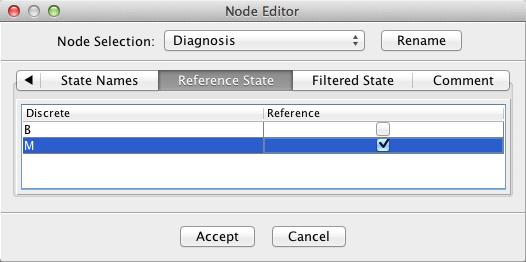
Alternatively, you can import and export Reference States with a dictionary. The dictionary syntax is the same as the syntax used for a Filtered State dictionary, i.e.:
[ <NodeName> "." | <ClassName> "." ] <StateName>The formal grammar of the Reference State Dictionary is as follows:
- If a node name is used as a prefix, a Reference State will be set only for the state of this node.
- If a class name is used as a prefix, a Reference State will be set for the nodes of the class that have this state.
- If no prefix is used, a Reference State will be set for all the nodes that have the specified state.
- A state can be present only once; otherwise, the last occurrence is chosen.
Tip
Should you forget the syntax, simply use the Node Editor on one or two nodes and then export the dictionary. You can then open the dictionary file with a text editor and see examples of the syntax.