
Generate Class Report
Context
Generate Class Report is one of the functions available in the Class Editor. A Class Report is a practical summary of all associations between nodes and Classes.
Usage
There are multiple paths to access Generate Class Report:
- Select
Menus > Edit > Edit Classes > Generate Class Report. - Select
Graph Panel Contextual Menu > Edit Classes > Generate Class Report. - Click on the
Classindicator in the Status Bar and clickGenerate Class Report.
The generated Class Report contains two tables, each with two columns:
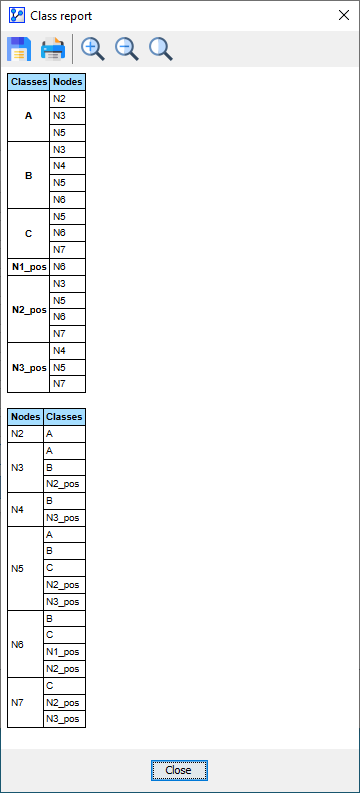
The first table features Class in the left column and Nodes in the right column, with the Classes column sorted alphabetically. The second table features Nodes in the left column and Classes in the right column, with the Nodes column sorted alphabetically. This second layout is particularly helpful for detecting nodes that are assigned to multiple Classes by accident.
As with all reports in BayesiaLab, you can save the report in HTML format, which can subsequently be opened in spreadsheet software, such as Excel, for further formatting or editing.