
Discretization
Context
- The Discretization screen is part of Step 4 — Discretization and Aggregation within the Data Import Wizard.
- This screen is only available if you designated at least one Continuous variable in Step 2 — Definition of Variable Types.
- BayesiaLab requires the discretization of all Continuous variables, and in this screen, you need to specify how to discretize those variables.
- The Discretization process determines how a Continuous variable will be imported into BayesiaLab, i.e., the number of intervals (bins) and the threshold values that define the interval ranges.
- These attributes define the transformation of the underlying Continuous variable in the dataset into a discretized Continuous node in BayesiaLab.
To learn more about the important distinction between Continuous and Discrete nodes, please see the Continuous Nodes and Discrete Nodes topics.
Usage
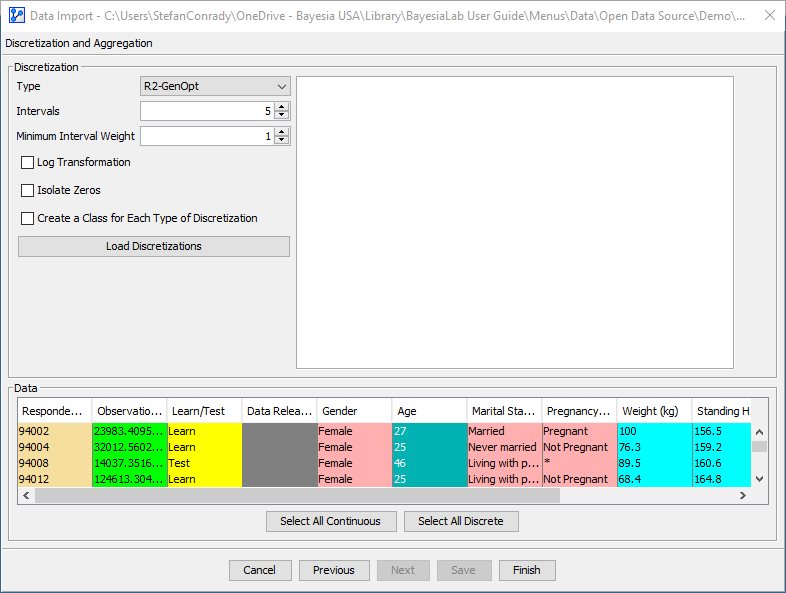
- Select one or more Continuous variables and click a header or the corresponding column.
- The Discretization panel appears.
- At the bottom of the screen, the Data panel carries over from Step 3 — Data Selection, Filtering, and Missing Value Processing, although now without any options.
Discretization Types Overview
- The first item in the Discretization panel is the Discretization Type dropdown menu.
- The items on this list can be grouped into Automatic Discretization versus Manual Discretization.
- The bottom item on the dropdown menu, Manual, refers to a Manual Discretization approach in which you have full control over thresholds, etc.
- The remaining eleven items all refer to different kinds of Automatic Discretization.

- However, even in Manual Discretization, you take advantage of the algorithms available with Automatic Discretization.