Labrador Retrievers

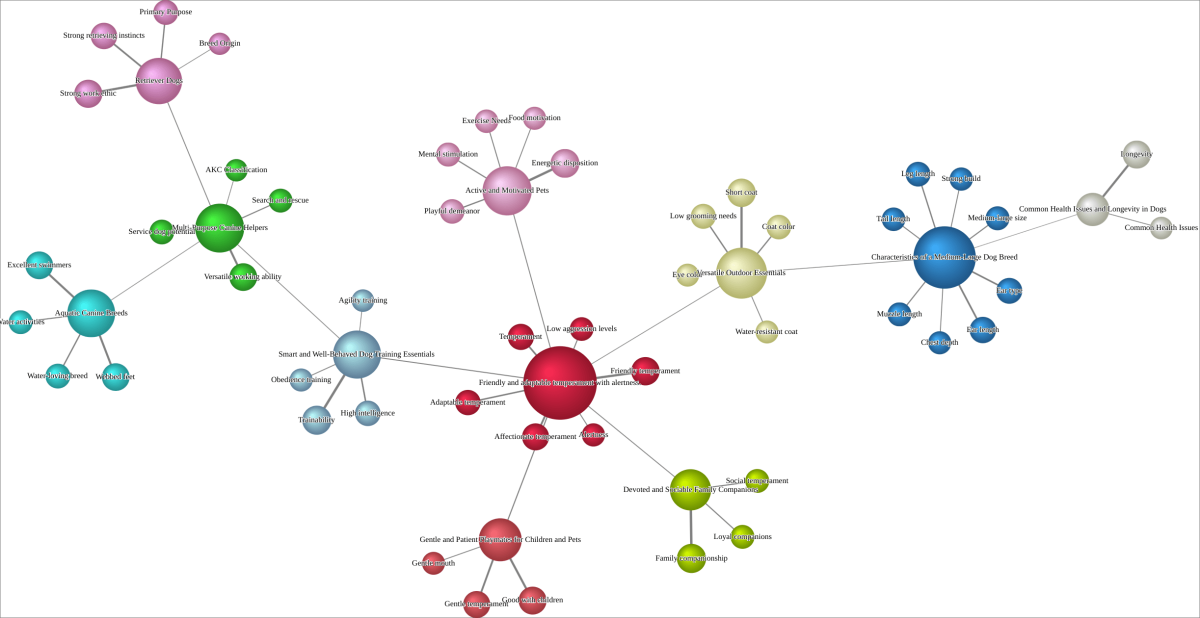
This example uses Hellixia to examine the Labrador Retriever as a single domain topic. The workflow elicits characteristics of the breed, generates embeddings for the resulting nodes, and learns a semantic network that shows how those characteristics are related.
Workflow for Creating a Semantic Network
Create a node named .
Use the following keywords to guide the Dimension Elicitor in its node analysis: Advantages, Aims, Behaviors, Characteristics, Competitors, Components, Definitions, Descriptions, Dimensions, Elements, Factors, Features, and Traits.
Inspect the dimensions suggested by Hellixia. Any dimensions that are irrelevant or redundant should be removed from your analysis.
Exclude the node.
Use the Embedding Generator on all remaining nodes.
Run the Maximum Weight Spanning Tree algorithm to create a semantic network.
Change the style of all nodes to Badges. This will display the comment within each node.
Run the Dynamic Grid Layout to organize the nodes on your graph. Note that this algorithm’s output is not deterministic; it may favor vertical, horizontal, or mixed orientations. Execute this layout multiple times until you find the most suitable arrangement.
Switch to Validation Mode F5.
As the graph you are building does not represent causal relationships, opt for the Skeleton View. This will remove all arc directions, leaving only the node connections without any specified direction.
Workflow for Node Force Analysis
Switch back to Modeling Mode F4.
Change all node styles to Discs.
Use the Symmetric Layout to organize your nodes in the graph.
Go to Validation Mode.
Conduct a Node Force analysis to evaluate the strength of associations in your graph.
Workflow for Creating a Hierarchical Semantic Network
Execute Variable Clustering. This operation categorizes analogous variables based on their semantic relationships.
Open the Class Editor and run Class Description Generator to generate descriptive names for the factors in question.
Use the Export Descriptions function, and save the newly created descriptions.
Return to Modeling Mode F4 and run Multiple Clustering to generate latent variables.
Run the structural learning algorithm Taboo. Ensure the Delete Unfixed Arcs option is enabled.
Use the descriptions you exported earlier as a Dictionary to rename the latent variables you’ve created.
Switch to Validation and apply Node Force.