
Stratification
Context
There are many research questions in which the cases of interest are very rare compared to regular observations. For example, when modeling fraud, the number of fraudulent transactions is presumably small compared to legitimate transactions. As a result, it would be difficult for a learning algorithm to detect associations between nodes related to those rare instances of fraud. With Stratification, you can modify the probability distributions within nodes by creating internal weights for specific states, i.e., the rare but important states. The probability distributions that are modified in this way push the learning algorithm towards discovering a network that is structurally more complex and can, thus, better represent rare observations. However, once the structure is learned, the parameters, i.e., the Conditional Probability Tables, are estimated on the original, unstratified dataset.
Usage
Select the nodes to be stratified. Go to Menus > Learning > Stratification. A dialog box opens in which you can specify the proportions of each state of the selected nodes. The marginal distributions of the selected nodes are shown in separate panels. At the bottom of each panel, the Entropy values that correspond to the distributions are shown. Move the sliders to set the proportions to the desired levels or type the percentages directly:
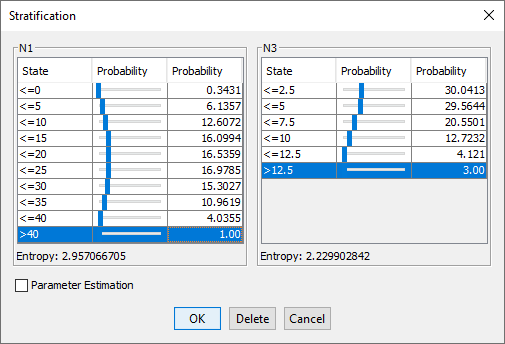
As you change the probability, the Entropy values are updated. Once you confirm the probabilities by clicking OK, the Stratification is set. All stratified nodes are now marked with the Stratification indicator. Additionally, the database icon in the Status Bar is tagged with a Stratification icon. You can remove the Stratification by right-clicking on the icon in the Status Bar and then selecting Remove Stratification from the Contextual Menu.